

Continuing with the second part of the post “Browsers: Protect your online privacy without becoming paranoid (Part 1/2)” in this second edition we will continue to see more surreptitious techniques used by the corporations behind the websites to spy on us through our browser.
The compilation and subsequent processing of the data revealed by our browser will allow them to later identify us unequivocally among millions of people, creating precise profiles about our tastes and online habits, with the ultimate goal of selling our data to third parties who will exploit this information to target us with targeted advertising.
In the previous article, we left it pending for this article to show some examples of the information that our browser reveals without us realizing it.
Today we will see how, by simply applying some good cybersecurity practices, this information can be reduced or even falsified.
In order not to fill this article with abundant images with examples of infinite data exposed by the browser, installed plugins, operating system, window size, etc., I will simply provide a couple of very clarifying images. One without any protection and one with it.
At the time of writing this article I was on Easter vacation in Germany at a relative’s house.
As my relative was at work, I took the opportunity to write this article and do some simple tests from his home WiFi.
In the first image you will see a small part of the information that my browser exfiltrated.
As I said before, the image only shows about 10% of the data that my browser reveals.
In the second image, you can see not only that the amount of information has been greatly reduced, but also that it shows the data of a VPN server in Spain to which I was connected, and not mine, thus masking my real data.
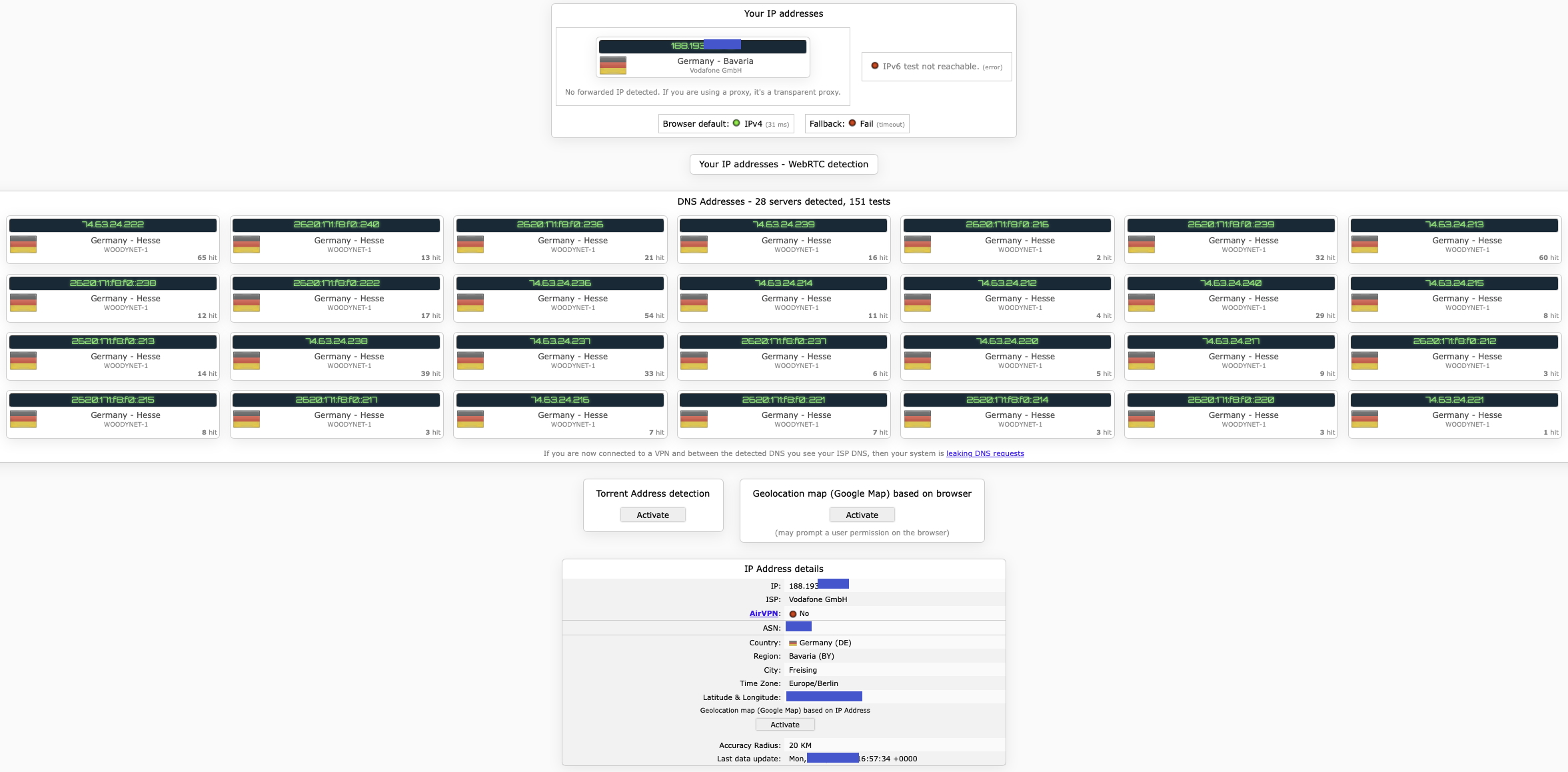 Browser data exfiltration without VPN
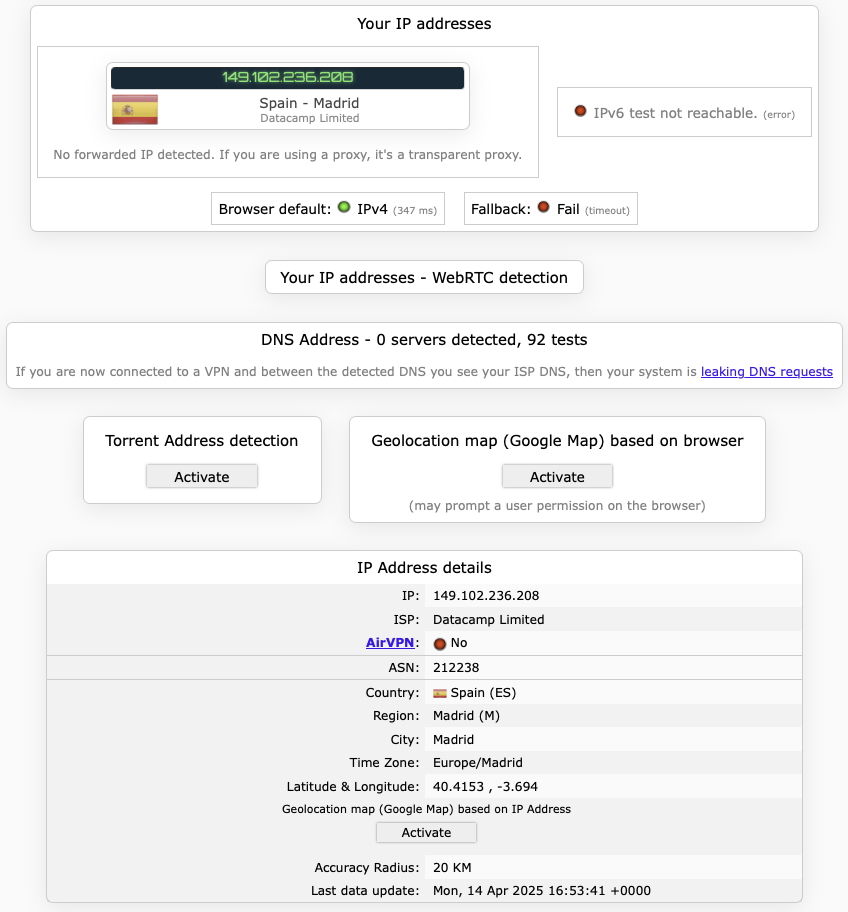 Browser data exfiltration with VPN
The first thing we can clearly see is the amount of information that appears in the image above.
We can see in the second image that, with the VPN enabled, we have tricked the browser into thinking that it was not only in Spain, but also that it detects a Spanish IP address together with location coordinates relating to the location of the VPN server hosted in Spain.
Isn’t it amazing?
With a more than reasonable accuracy the navigator can detect the city you are in and estimate geographic coordinates with a margin of error of less than 20km.
As you can see in the first image, in order to preserve my relative’s privacy, I have crossed out the IP that was assigned to his home address and the coordinates of his house.
I checked the coordinates detected by the navigator by entering them in Google Maps and the error was only 2.5 km. By the way, I had the location data disabled in the browser settings.
It is important to remember that many sites use geolocation techniques even without expressly warning the user, so it is advisable to review the configuration of our device to minimize data sharing.
If this is not espionage, what is?
Do the test yourselves.
Go to either of these two websites: amiunique.org or ipleak.net and you will see how many parameters you are revealing.
These parameters are what unmistakably identify you among millions of people around the world.
If you want to investigate a little more about which browser best protects your privacy, I advise you to try connecting to the following web page from different browsers such as Brave, Chrome, Edge, Firefox, Librewolf, Opera, Safari, Tor (The Onion Router), Ungoogled o Vivaldi: https://privacytests.org/
I’ll tell you in advance that I already did the test, so if you don’t want to bother, I’ll tell you that the most complete and secure browser seemed to me to be Brave.
Although if what we are looking for is extreme privacy, you may find the browser Tor (The Onion Router, “onion router”) even better option. Tor (The Onion Router), but it is also slower..
It is true that, with a correct configuration and the appropriate browser extensions, any of them could achieve acceptable levels of security and privacy, but with the configurations they usually come with by default, only the two above seem the most appropriate.
Websites that contain tracking technology for advertising purposes often load ** JavaScript code** or small invisible images that are used to create the user’s advertising profile in ad targeting.
These techniques are often used in combination with cookies to further refine the profiling.
Other websites use the technique called Canvas fingerprintingwhich is designed to identify users even if they block third-party cookies.
It is often used to track people’s behavior on different sites. As an example, I have used the page https://themarkup.org/blacklight, which is a very useful tool to inspect which trackers are loaded on each website. Try it!
This web tool lets you know exactly what methods a site uses to spy on you and shows how much it cares (or doesn’t care) about respecting your privacy.
During my test, Blacklight detected a script that was automatically loaded in the background when I visited the page, and whose function was to secretly draw an image in my browser, in order to uniquely identify my device from then on.
I could not determine whether the website uses this technique to monitor my browsing behavior, to prevent fraud or even for bot detection. But what is certain is that, without my consent, it inserted an image for tracking purposes on my device.
 Tracking image
Nearly 50% of websites use Google Analytics for tracking purposes, allowing them to track users and then display targeted advertising to them across different Internet platforms.
This feature enables a website to create custom audiences based on how the user interacts with the particular page, and then follow the user around the Internet to deliver targeted advertising on sites using Google Ads and Google Display & Video 360.
Do you now understand why that drill you were looking at in an online store ends up chasing you all over the Internet? Well, Google Analytics is one of the trackers that makes such tracking possible.
Myself, I once bought a drill from Amazon.
It made me want to call Amazon and tell them:
«Amazon, stop putting me ads for drills all the time, I’m not a drill collector, I don’t need hundreds of drills in every room, I don’t give drills as gifts; I bought you a drill once and that’s it, I already have all the drills I need. “Thank you.” ».
This situation, although absurd, is true and sometimes has worse effects on users.
Some time ago I read the case of a pregnant woman who, in the months leading up to her delivery, searched for all kinds of information about babies. She later suffered the great misfortune of having a complicated delivery and losing her baby.
This terrible outcome, which of course Google did not know about, did not prevent the mother from continuing to receive constant information about baby articles for months after the death, to the further suffering and reminder of her misfortune.
This practice, which may have seemed like a good idea in the past, has long since caused an enormous rejection in society, to the point that users are increasingly interested in certain browsers and search engines that respect their privacy and move away from these despicable practices.
Even so, not everyone perceives these ads as negative.
Some people find product suggestions related to their recent searches useful.
However, most agree that the lack of control over the use of personal data can be unsettling and, at times, damaging.
As anticipated above, another technique widely used to track us are cookies. To be more precise, there are several types of cookies, but the most intrusive are “third party cookies”.
If someone is curious to know which third-party cookies are applied on each website they visit, they just have to, instead of closing at full speed that annoying little box that asks if we want to know the Privacy Policy, open it to check the handful of advertising companies that will be in charge of tracking and collecting our browsing, with the ultimate goal of exchanging or selling such information to other companies, so they can do something like:
«This user has just searched for information about drilling machines, so let’s send him by all possible means advertisements about drilling machines».
The challenge of keeping the Internet open and accessible to all requires us to make a much greater effort to protect privacy.
That means not only an end to third-party cookies, but also to any technology used to track people as they browse.
It is not only annoying, but people are starting to see ghosts where there are none:
«I just had a conversation with a friend and, minutes later, I’m starting to see ads about it… my phone is spying on me!».
Several experiments have shown that this sensation is the result of paranoia rather than a reality in which it seems that we are being monitored at all times.
Although I also tell you one thing, I have also read other articles where, not from a cell phone, but from a home IoT device was listening.
Subsequent complaints ended with the company’s excuse that it was a factory configuration error.
The tech giants know so much about us that they really don’t need to listen to our conversations to deliver targeted ads.
Location data, browsing history or tracking pixels provide more than enough information to predict what a user might be thinking of buying.
You may have noticed the insistence of companies like Google that, every time you open their browser, they ask you to sign in for a “better experience”.
We already talked about how much we should be wary when any application encourages us to do something to improve our user experience, because that “improvement” is usually associated with a reduction of our privacy.
If you do a Google search on any topic, especially a sensitive one (e.g. a disease you suffer from), and you are logged in to your account, Google could save and associate to your profile everything you are interested in, buy or worried about, etc.
However, if you decide to put up with the constant abuse and don’t give in to the temptation to log in, Google will have a much harder time associating everything you search for with you.
It is true that, in exchange, you lose interesting features such as the synchronization of all saved bookmarks or the automatic installation of your favorite extensions on all devices, but this can also be achieved by logging in and logging out again after the synchronization is complete.
Certain sacrifices of convenience or usability may be worth it when it comes to preserving our privacy from companies that have demonstrated in the past that the only thing they seem to care about is doing business at the expense of our data.
Moreover, they do not always protect them adequately and this has been seen on numerous occasions when they have been hacked and our data has ended up in repositories full of security breach data that is then exploited by other cybercriminals.
So much collection and buying and selling of user data, for what? Are we really seeing more interesting ads in recent years?
I would say no.
They are still of very poor quality and, to top it off, they are repetitive, showing us ads for things I have looked for before and plan to buy, which gives the impression that some companies are paying for nothing.