

Using incognito mode doesn’t make you invisible or protect your privacy, so if you’re thinking of using it at work, get it out of your head.
Session replay tools such as FullStory, Hotjar or Microsoft Clarity record your every mouse movement, keystroke (even the ones you delete!) and the time you hesitate before closing a window.
These data are used for:
- **Anticipate your steps. **Analytical platforms such as Mixpanel build true behavioral profiles based on navigation patterns.
- Modulate your decisions. A/B testing frameworks - Optimizely, *Google Optimize -*alter colors, sizes or button positions to trigger impulse purchases.
A recent study (FullStory, 2023) concluded that 89% of web applications incorporate at least one session replay tool.
Recordings often capture sensitive information, such as passwords that were accidentally typed into visible fields.
Does incognito mode protect me?
The name suggests anonymity, but the reality is far less glamorous.
Incognito / private mode does only two things:
- Blank" startup. You start as if it were a new device: no cookies, no cache and without being logged in anywhere.
- Local deletion when closing the window. History, generated cookies and temporary files disappear from the disk at the end of the session.
This could be interesting to protect you from prying eyes with whom you share your computer, tablet or mobile, but it does not hide anything:
- the website you connect to,
- your Internet Service Provider (ISP),
- your company or educational center,
- and - depending on the configuration - to Google itself.
Following the Brown v. Google class action lawsuit (2020-2024), Google agreed to delete billions of records collected in incognito mode and, as of January 2025, Chrome displays a clearer warning:
“Your activity may still be visible to websites, your employer, or your Internet provider.” (Newman, 2024).
Having clarified this and knowing what it really does protect you from, you may still want to continue using private or incognito mode, so I’ll show you how to set it up so you don’t forget.
For example, when I use a browser from a computer that is not mine, I usually resort to incognito mode to prevent someone else who also uses that computer from seeing what I have been visiting and so on.
To not forget to activate it or waste time with it, I use a little trick to open it directly, I’ll explain: (This I will detail for Microsoft Edge also works for other browsers)
The first thing to do is to create a shortcut on the browser desktop. Then, we click with the right button of the mouse and go to “Properties”.
In the “Target " field, without modifying anything else, add -inprivate at the end (or the corresponding command depending on the browser):
- Edge: -inprivate
- Chrome: -incognito
- Firefox: -private
Apply, click “OK” and that’s it.
The next time you double-click, the browser will start directly in its private mode.
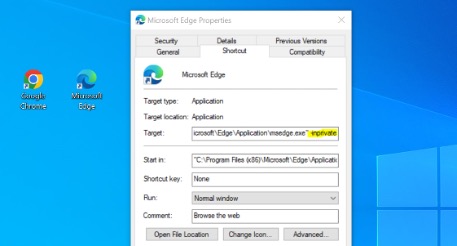 Adding private mode to an Edge browser shortcut
** Safari** works differently: it does not allow you to force private mode via a shortcut, but you can press ⌘ + Shift + N or choose File → New Private Window.
Tracker blockers via browser extensions: pros and cons
Built-in blockers or extensions such as uBlock Origin and Privacy Badger are natural allies; however, they sometimes break critical website functions (shopping carts, video players, payment gateways).
If you detect bugs on the page you are trying to visit, try disabling the blocker only on that domain or use your browser’s “strict” mode only when visiting unknown sites.
Privacy-focused browsers
| Browser | The best | Precautions |
| Brave | Aggressive ad and tracker blocking; automatic history purging | Uses its own ad opt-in system |
| Tor Browser | Hides your IP and routes traffic through multiple layers | Slow speed; some services block it |
| Firefox (with Enhanced Tracking Protection) | Balance between compatibility and privacy | Balance means a little less protection |
As I always point out, the key is to explore the advanced settings: most of these browsers allow you to purge cookies on closing, isolate cookies by site*(Firefox Containers*) or force HTTPS.
VPNs: an additional, non-magical layer
Although we will discuss VPNs*(Virtual Private Network*) at length in another article, by way of introduction we will say that VPNs encrypt your traffic and hide your IP address from the ISP and the local network.
Even so, it is extremely important to remember that the VPN itself can see all your traffic, so you should always choose a VPN provider with a great reputation.
Opt for VPN providers that indicate that they are independently audited, with verified no-logs policies and privacy-friendly jurisdictions (e.g., Switzerland or Panama).
In short, incognito mode is useful for not leaving local traces, but it is not an invisibility cloak.
To reduce your digital footprint:
- Combines incognito mode with tracking blockers and, when necessary, a reliable VPN.
- Limit permanent login to social networks or Google services when browsing sensitive topics.
- Regularly review what extensions and scripts you allow in your browser.
- Keep your software up to date: each version fixes vulnerabilities that could expose your data.
By following these simple steps, you will not disappear from the Internet, but you will regain a healthy margin of control over your digital footprint.